


Showing posts with label Hibernate. Show all posts
Showing posts with label Hibernate. Show all posts
 19:54
19:54


Hibernate Transaction is associated with each operation we are performing within a session. We have to use org.hibernate.Transaction class to perform transaction in hibernate.
How Transaction object get initialized ?
As we know translation is associated with the session , so we can initialize Transaction using the beginTransaction() method which is a abstract method in Session interface and returns the Transaction object.
After getting session object we need to call beginTransation()--->
Transaction tx = session.beginTransaction();
And after performing the operation using the session object in the database it needs to committed but in hibernate auto-commit is disable so we need to explicity commit the transation by using the following syntax,
tx.commit();
Note: Transaction commit should be done before closing the session, otherwise it fails to commit. So commit must be done after performing any operation and before closing the session.
Important points regarding Transaction Object
1. It is not thread -safe that means any thread can access this object. So its better to close session after finishing the operation.
2. We can have single commit for multiple operation within a single session. So no need to create multiple Transaction object for each operation within a session.
3. Must commit the database operation otherwise the operation doesn't reflect the changes in the database table and hence hibernate unable to perform the operation.
In case of JDBC we the developer are responsible for establishing and terminating the database connection but in case of Hibernate, it is only responsible for establishing and terminating database Connectivity , we only need to indicate by simply calling some pre-defined method by the hibernate session. For ex-
In hibernate
1 . Insert can be performed by calling save() method.
2. Select can be performed by calling load() method. etc
How to create session In hibernate
1. Creating the SessionFactory instance.
After getting the SessionFactory which holds all the information about the database by reading the hibernate Configuration file, need to call the openSession() of SessionFactory interface which an abstract method and returns the Session instance.
Initializing Session instance creating the database Connection and opening the session which involves the database activity like insert,delete, update etc.
In hibernate
1 . Insert can be performed by calling save() method.
2. Select can be performed by calling load() method. etc
How to create session In hibernate
1. Creating the SessionFactory instance.
SessionFactory factory=null;

Configuration cfg=new Configuration();

cfg=cfg.Configure();

factory=cfg.buildSessionfactory();
2. After creating Sessionfactory call openSession() method which returns the Session instance. Like this
Session session = factory.openSession();
By calling openSession() a session will be created and a session is responsible for performing a database operation. For multiple database operation we must have that much Session instance.
Note: Session is not a thread -safe that means as long as it is open it is in risk of accessible by other thread also so it must be closed after operation is over.
How to close session?
It can be simply closed by calling close() with Session instance. Like this
session.close();
States of Session Instance.
There are three states of instance of Session which behaves according to the persistence object creation.
1. Transient: It is the initial state which represents that persistent class instance is not associated with any of the Session. That means it doesn't involve with any activity/operation with the database.
2. Persistent: It is the state of Session which represents that persistent class instance is associated with the Session and it has representation in the database and hence will be involved with the database activity/operation.
3. Detached: It is the final state of Session which represents that the Session is closed and hence persistent class instance get detached.
Note: After Session creation Transaction creation is mandatory because we need to commit every operation/activity we are performing within the session. Otherwise changes will not reflect in the database. And by default auto-commit is disable or de-active so we need to commit explicitly for that we need to create transaction for each database operation.
For details about Hibernate Transaction click here Hibernate Transaction .
org.hibernate.SessionFactory is an interface implemented by the hibernate vendors whose instance is created by calling the buildSessionFactory() which is implemented in the org.hibernate.cfg.Configuration class and must be called with the Configuration class object.
buildSessionFactory() method is org.hibernate.cfg.Configuration class return the SessionFactory interface instance. Internally it returns the SessionFactoryImpl class instance which implements SessionFactory interface, like this
public SessionFactory buildSessionFactory() throws HibernateException{ return new SessionFactoryImpl(this,this.mapping,settings,listeners);}
How to get SessionFactory Instance
1. Create Configuration class object. like this
Configuration cfg=new Configuration();
2. With the Configuration class instance class the Configure() method by specifying the hibernate Config xml means which configuration file is to be read by SessionFactory object and return the Configure class instance.
cfg=cfg.Configure(); cfg=cfg.Configure(String resource); //Name of the xml file in
string format.
In the above syntax Configure() method without argument by default takes "hibernate.cfg.xml" name as the hibernate Configuration xml file. Or we have any different name then we need to use Configure(String resource) method and mention the file name in the String format.
3. Now after getting the Configuration class instance with the Configure() method , we need to call buildSessionFactory() which finally returns the SessionFactory instance and need to store in the SessionFacroy reference type.
SesionFactory factory=cfg.build.SessionFactory();
Note: buildSessionFactory() method is responsible to parse/read the hibernate configuration xml file and store all the required information in the SessionFactory object.
Now SessionFactory Instance will have information about the driver_class and all other required information about the database. With this we can conclude that one SessionFactory is responsible for single database.
If we want to have multiple database connectivity then we have to declare as much SessionFactory object.
Why we need to create SessionFactory instance?
It is because SessionFactory Instance is having all the required information about the database for database Connectivity and are responsible for database connectivity and session creation. To know more about Hibernate Session click here Hibernate Session.
Cache is representation of database near to application. when you cache the read-mostly(which will be repeatedly used) data, you can reduce the number of round trip between your application server and database server. Which increase performance of your application.
In general you can have three types of cache scope :
In general you can have three types of cache scope :
- Transactional scope cache.
- Process scope cache.
- Clustered scope cache.
2. Process scope cache : This kind of cache can be accessed by multiple transaction running in the application or process.
3. Clustered scope cache : When your enterprise application is large scale application then you must use clustered environment where multiple server is clustered and integrated with LBS(load balancing server) for running the request. In clustered scope cache when one node caches the data then same data will also be replicated to other nodes automatically.
First Level Cache :
First Level Cache :
- Session cache is first level cache.
- Session cache is transnational cache.
- Session cache is enabled by default and should not be disabled.
- When ever you insert or update or select or delete the records then those persistence object will be placed automatically in session cache.
- You can remove the persistence object from session cache using evict(obj) and clear().
- Query cache is second level cache.
- Query cache can be process scope and cluster scope cache.
- Query cache is disabled by default. You have to enable explicitly if required.
- When ever you execute the hibernate Queries HQL, QBC etc then all records returned by select statement will be placed in Query cache.
- Enable the query cache by writing the following property in hibernate configuration doc.
<property name="hibernate.cache.use_query_cache">true</property> - Specify the required cache provider in hibernate configuration document.
<property name="hibernate.cache.provider_class">org.hibernate.cache.EhCacheProvider</property>
Note : Cache provider supported by hibernate
->HashtableCacheProvider
->EhCacheProvider
->OSCacheProvider
->SwarmCacheProvider
->TreeCacheProvider(jboss cache provider) - Specify the required caching concurrency strategies in hibernate mapping doc.
<cache usage="xx">
here xx can be one of the following
->read-only
->nonstrict-read-write
->read-write
->transactional
Note : You have to specify caching concurrency strategies separately for class, collections and Associations. - call setCacheable() method with true value on query or criteria or SQLQuery objects.
Query q=session.createQuery("from customer");
q.setCachable(true);
List list=q.list(); - Specify the storage implementations and Expiration policies
Note : this will change from cache provider to provider.
Transaction is the process of performing multiple database operations as one unit with all nothing criteria.
I:e when all the database operations in the unit are successful then transaction is successful and should be committed. When any one database operation in the unit are failed then transaction are failed and should be rolled back.
When you implement transaction property in your application it guarantees ACID properties.
A- Atomicity
C- Consistency
I- Isolation
D- Durability
Atomicity : It will give you a guarantee that the whole work will be performed as a unit. If one part of transaction fails then entire transaction fails.
Consistency : Consistency is about ensuring that any transaction will bring the database from one valid state to another.
Isolation : Many transaction may run concurrently. These concurrently running multiple transaction may disturb other transaction that is multiple transaction should run isolately.
Case A : Consider the case where multiple transaction running concurrently and using multiple rows of account table.
tx1 -> 101
tx2 -> 102
tx3 -> 103
1. withdraw from 101
2. withdraw from 102
3. withdraw from 103
Case B : Consider the case where multiple transaction running concurrently and using single account row of account table.
acc no: 99
1. transfer(withdraw)
2. bank teller(withdraw(deposite))
3. loan EMI(withdraw)
in case B you may get some problem which is called as transnational concurrency problems.
Dirty read problem :
I:e when all the database operations in the unit are successful then transaction is successful and should be committed. When any one database operation in the unit are failed then transaction are failed and should be rolled back.
When you implement transaction property in your application it guarantees ACID properties.
A- Atomicity
C- Consistency
I- Isolation
D- Durability
Atomicity : It will give you a guarantee that the whole work will be performed as a unit. If one part of transaction fails then entire transaction fails.
Consistency : Consistency is about ensuring that any transaction will bring the database from one valid state to another.
Isolation : Many transaction may run concurrently. These concurrently running multiple transaction may disturb other transaction that is multiple transaction should run isolately.
Case A : Consider the case where multiple transaction running concurrently and using multiple rows of account table.
tx1 -> 101
tx2 -> 102
tx3 -> 103
1. withdraw from 101
2. withdraw from 102
3. withdraw from 103
Case B : Consider the case where multiple transaction running concurrently and using single account row of account table.
acc no: 99
1. transfer(withdraw)
2. bank teller(withdraw(deposite))
3. loan EMI(withdraw)
in case B you may get some problem which is called as transnational concurrency problems.
- Dirty read problem.
- Repetable read problem.
- Phantom read problem.
- READ_UNCOMMITTED
- READ_COMMITTED
- REPETABLE_READ
- SERIALIZABLE
Dirty read problem :
- When transaction reads the dirty value(modified but not committed) then you may get some inconsistent result.
- To avoid dirty read you have to lock the column(cell).
- To lock the column you have to apply isolation level called READ-COMMITTED.
- When a transaction is reading the same row repeatedly, you may get different set of values in different reads. this kind of problem is called repeatable read problem.
- To avoid repeatable read problem you have to lock the row.
- To lock the row you have to apply isolation level called REPEATABLE-READ.
- When a transaction is reading the set of row repeatedly you may get different set of rows in different reads this kind of problem is called phantom read problem.
- To avoid phantom read you have to lock the entire table.
- To lock the table you have to apply isolation level called SERIALIZABLE.
- Local transaction :
When a single database is participating in the transactional operation then it is called local transaction. - Distributed transaction :
When two or more database are participating in the transaction operations then it is called as distributed transaction.
- Flat transactions : A simple transaction that perform one or more operations as a unit operation.
- Nested Transactions : as the word nested says one transaction under another transaction.
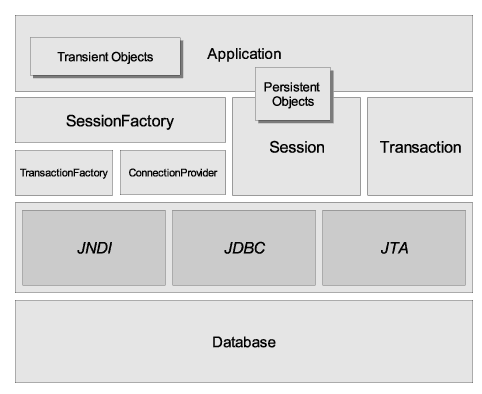
Configuration or AnnotationConfiguration :
- These are available in org.hibernate.cfg package. This is the first class that will be instantiated by hibernate application.
- You can use Configuration or AnnotationConfiguration class object for 2 task :
-> calling configure or configure(String) method.
-> calling buildSessionFactory() method. - configure() method is responsible for :
-> reading the data from hibernate configuration document.
-> reading the data from all the hibernate mapping documents specified in configuration document. - buildSessionFactory() is responsible for creating SessionFactory object.
- Configuration or annotation configuration object is single threaded and short lived.
- Once SessionFactory object is created then there is no use with Configuration or AnnotationConfiguration object.
- This interface is available in org.hibernate package.
- SessionFactory object is Multi-Threadded and long lived.
- When you call buildSessioFactory() method on Configuration object then following task will happen.
-> set the default to many parameters like batch, size fetch size etc.
-> generate and catches the sql queries required.
-> select the Connection provider
-> select the TransactionFactory. - SessionFactory is :
-> factory of Session object.
-> client for connection provider.
-> client for TransactionFactory. - You need to create one SessionFactory per database.
- when you are using multiple databases then you need to write multiple hibernate configuration docs.
- This is an interface available in org.hibernate package.
- Session object is single threaded and short lived.
- Session represents period of time where user can do multiple database operation.
- Session Object :
-> uses TransactionFactory to get the transaction.
-> get the connection from ConnectionProvider.
- When transaction is started the following task will happen.
-> session cache will be created
-> connection will be taken and will be associated with the current session. - While transaction is running following task will happen.
-> when any object is participated in session operations, that will be placed in session cache. - When transaction is committed the following task will happen :
-> session will be flushed(here the synchronization of persistent data with the database will be performed)
-> session cache will be destroyed
-> commit will be issued to database
-> connection will be released
Today I am going to tell you other alternative you can do in order to avoid LazyInitializationException: Session has been closed. If you are using SPRING with HIBERNATE that you can take the advantages of IOC and AOP. These are some functions that you must have to know in order to understand the working of this concept.
session.connect() : It is a function that will be called on a Session object it is responsible for establishing the connection with the database.
session.disconnect() : It will release the connection resources. It doesn't mean you are closing the connection.
session.flush() : this function is used to serialize the data to the database. If you have something in the session that is not submitted to DB you can submit them using session.flush().
So here is the utility class that you can take :
HibernateUtil.java
I am taking one interceptor from where we can call the functions from out utility class and you can call it by using AOP.
here is the code that you can apply on your service layer using AOP.
ConnectionService.java
Now you have to configure this in spring configuration file and you have done.
LazyInitializationException: Session has been closed
session.connect() : It is a function that will be called on a Session object it is responsible for establishing the connection with the database.
session.disconnect() : It will release the connection resources. It doesn't mean you are closing the connection.
session.flush() : this function is used to serialize the data to the database. If you have something in the session that is not submitted to DB you can submit them using session.flush().
So here is the utility class that you can take :
HibernateUtil.java
public class HibernateUtil {
    @Autowired
    private static SessionFactory sessionFactory;
    private static final ThreadLocal threadsession=new ThreadLocal();
    private static final ThreadLocal threadtransaction=new ThreadLocal();
    public SessionFactory getSessionFactory() {
        return sessionFactory;
    }
    public void setSessionFactory(SessionFactory sessionFactory) {
        this.sessionFactory = sessionFactory;
    }
    public void connect() {
        try {
            Session session=threadsession.get();
            if(session==null) {
                getSession();
                session=threadsession.get();
            }
            session.reconnect();
        }
        catch(Exception e) {
            e.printStackTrace();
        }
    }
    public void diconnect() {
        Session session=threadsession.get();
        session.disconnect();
    }
    public Session getSession()    {
        Session session=threadsession.get();
        try {
            if(session==null) {
                session=sessionFactory.openSession();
                threadsession.set(session);
            }
        }
        catch(Exception e) {
            e.printStackTrace();
        }
        return session;
    }
    public void closeSession() {
        try {
            Session session=threadsession.get();
            threadsession.set(null);
            if(session!=null && session.isOpen())
                session.close();
        }
        catch(Exception e) {
            e.printStackTrace();
        }
    }
    public void beginTransaction() {
        Transaction tx=threadtransaction.get();
        try {
            if(tx==null) {
                tx=getSession().beginTransaction();
                threadtransaction.set(tx);
            }
        }
        catch(Exception e) {
            e.printStackTrace();
        }
    }
    public void commitTransaction() {
        Transaction tx=threadtransaction.get();
        try {
            if(tx!=null && !tx.wasCommitted() && !tx.wasRolledBack())
                tx.commit();
            threadtransaction.set(null);
        }
        catch(Exception e) {
            rollbackTransaction();
            e.printStackTrace();
        }
    }
    public void rollbackTransaction() {
        Transaction tx=threadtransaction.get();
        try {
            threadtransaction.set(null);
            if(tx!=null && !tx.wasCommitted() && !tx.wasRolledBack()) {
                tx.rollback();
            }
        }
        catch(Exception e) {
            e.printStackTrace();
        }
        finally {
            closeSession();
        }
    }
}
I am taking one interceptor from where we can call the functions from out utility class and you can call it by using AOP.
here is the code that you can apply on your service layer using AOP.
ConnectionService.java
public class ConnectionService {

 @Autowired
 HibernateUtil2 hutil;
 public void startConnection() {
  hutil.connect();
  hutil.beginTransaction();
  System.out.println("before");
 }
 public void closeConnection() {
  System.out.println("after");
  hutil.commitTransaction();
  hutil.diconnect();
  hutil.getSession().flush();
 }
}
Now you have to configure this in spring configuration file and you have done.
LazyInitializationException: Session has been closed
Once the session is closed you can not be able to access the data from detached object and if you do you will get a LazyInitializationException: Session has been closed. It means that your session and session transaction is closed and you are trying to access the information from the proxy that is not initialized.
These are the solutions to overcome this LazyInitializationException :
I will explain all of these in my next post but now we are going to talk about Open Session In View(OSIV).These are the solutions to overcome this LazyInitializationException :
- Open session in view.
- Thread local design pattern.
- Command design pattern.
- Long session
To implement OSIV in your project you have to use filter that will open the session with every coming request and close the session after the JSP page is rendered to the client.
HibernateUtil
public class HibernateUtil {

    static SessionFactory factory;

    static {

        Configuration cfg=new Configuration();

        cfg=cfg.configure();

        factory=cfg.buildSessionFactory();

    }

    public static SessionFactory getSessionFactory() {

        System.out.println("factory: "+factory);

        return factory;

    }

}
In the above hibernateutil class you have static SessionFactory instance that will be initialized at the time of starting the server. So after starting the server you have an initialized instance of SessionFactory and you can get the object by using getter of this.
HFilter
public class HFilter implements Filter {

 private SessionFactory sf;
 @Override
 public void doFilter(ServletRequest hreq, ServletResponse hres,
   FilterChain chain) throws IOException, ServletException {
  // TODO Auto-generated method stub
  try {
   sf.getCurrentSession().beginTransaction();
   chain.doFilter(hreq, hres);
   sf.getCurrentSession().getTransaction().commit();
  }
  catch(Exception e) {
   e.printStackTrace();
  }
 }

 @Override
 public void init(FilterConfig fc) throws ServletException {
  // TODO Auto-generated method stub
  sf=HibernateUtil.getSessionFactory();
 }

 @Override
 public void destroy() {
  // TODO Auto-generated method stub

 }
}
Above you can see the servlet filter code that is responsible for managing the session. It will open the session on every incoming request and close the session after rendering the presentation page.
In the above code you can see that i used
sf.getCurrentSession().beginTransaction();Here i didn't try to open and close the session i just used getCurrentSession() and begin the transaction on the session so you may question that who is responsible for opening and closing the session. Actually if you call getCurrentSession() then no need to open the session it will be initialized when you begin the transaction and closed when you commit the transaction.
So best of luck guy's.
Today i am going to tell you what are the Hibernate Fetching Strategies and how to use that in order to tune the performance of your applications.
So these are the fetching strategies in hibernate :
So these are the fetching strategies in hibernate :
- join fetching(fetch="join") : In this case Hibernate will retrieves all the information in a single select statement.
- select fetching(fetch="select") : Here the Hibernate will pass the second select statement for fetching the associated collection unless you disable lazy fetching by specifying lazy="false".
- subselect fetching(fetch="subselect") : Here in this case the collection will be fetched using subselect sql statement unless you explicitly disable lazy fetching using lazy="false";
- batch fetching(batch-size="") : As the name suggest if you want to customize the number of select statement you can use batch fetching. It can be configured on both class and collection label.
- immediate fetching(lazy="false") ; Hibernate will load all the associated child collection with the parent.
- lazy collection fetching(lazy="true") : here the associated collection will be loaded only when you use it or you can perform any operation on it(one of the best practice to tune the performance of your application).
- extra lazy : specific element of the collection is accessed as needed. Here in this case hibernate will not load the whole collection unless you tried. It is suitable for large collection.
N+1 is one of the most famous question among java developers. It will give some performance issue if you where working on a large project. So it's better to resolve it using some below techniques.
What is n+1 problem ?
Ans: I am taking one example to let you understand that what n+1 problem is.
Suppose you have number of students in a college and every students have some number of books.
so one to many relation is between student and books.
Now suppose that you have to iterate through the collection of student and display all the books name he have. So the query will looks like this
Here you have 1 select statement for the student and if you have n number of students you have to fire n more query to select the books. So at the last you have to put n+1 select statement in order to perform this operation.
Now the next question is how to solve it ?
Using join fetching(it will join the parent and children and fetch all the information in a single statement) we can able to solve n+1 problem.
Now our next query will look like this
What is n+1 problem ?
Ans: I am taking one example to let you understand that what n+1 problem is.
Suppose you have number of students in a college and every students have some number of books.
so one to many relation is between student and books.
Now suppose that you have to iterate through the collection of student and display all the books name he have. So the query will looks like this
"select * from Students"

"select * from Books where studentId=?"
Here you have 1 select statement for the student and if you have n number of students you have to fire n more query to select the books. So at the last you have to put n+1 select statement in order to perform this operation.
Now the next question is how to solve it ?
Using join fetching(it will join the parent and children and fetch all the information in a single statement) we can able to solve n+1 problem.
Now our next query will look like this
"from Students s join fetch s.Books b"
Subscribe to:
Posts (Atom)

